Multirotor and VTOL packs
The flight controller sees the weakest cell, not the average, and can trigger failsafes on it — plus real pack current for accurate remaining-charge estimates.

Capabilities
Event-based visionNewCameras that see fast movement without blur.Battery and powerBattery boards that report every cell to the machine.Long-range linksRadio links that keep a drone connected far from its pilot.Embedded hardwareElectronics built for heat, shaking and weather.Products
MODB-BB 6S–12SMonitor, balancer and fuel gauge for large drone packs.MODB-SB 3S–8SCompact BMS with on-board current sensing to 100 A.MODL-Core pMDDL2450Carrier board for Microhard pMDDL IP-mesh radios.All productsWhich battery board do I need?Battery boards for your applicationCompany
HomeAboutTell us your problemSmart battery management · 3S–8S
Measures, balances and reports. Never disconnects.
Every cell, the pack current and five temperatures — published to the flight controller, dock or ground station over isolated CAN FD and DroneCAN.
Rev A0 · layout complete · prototypes next
01 / In plain words
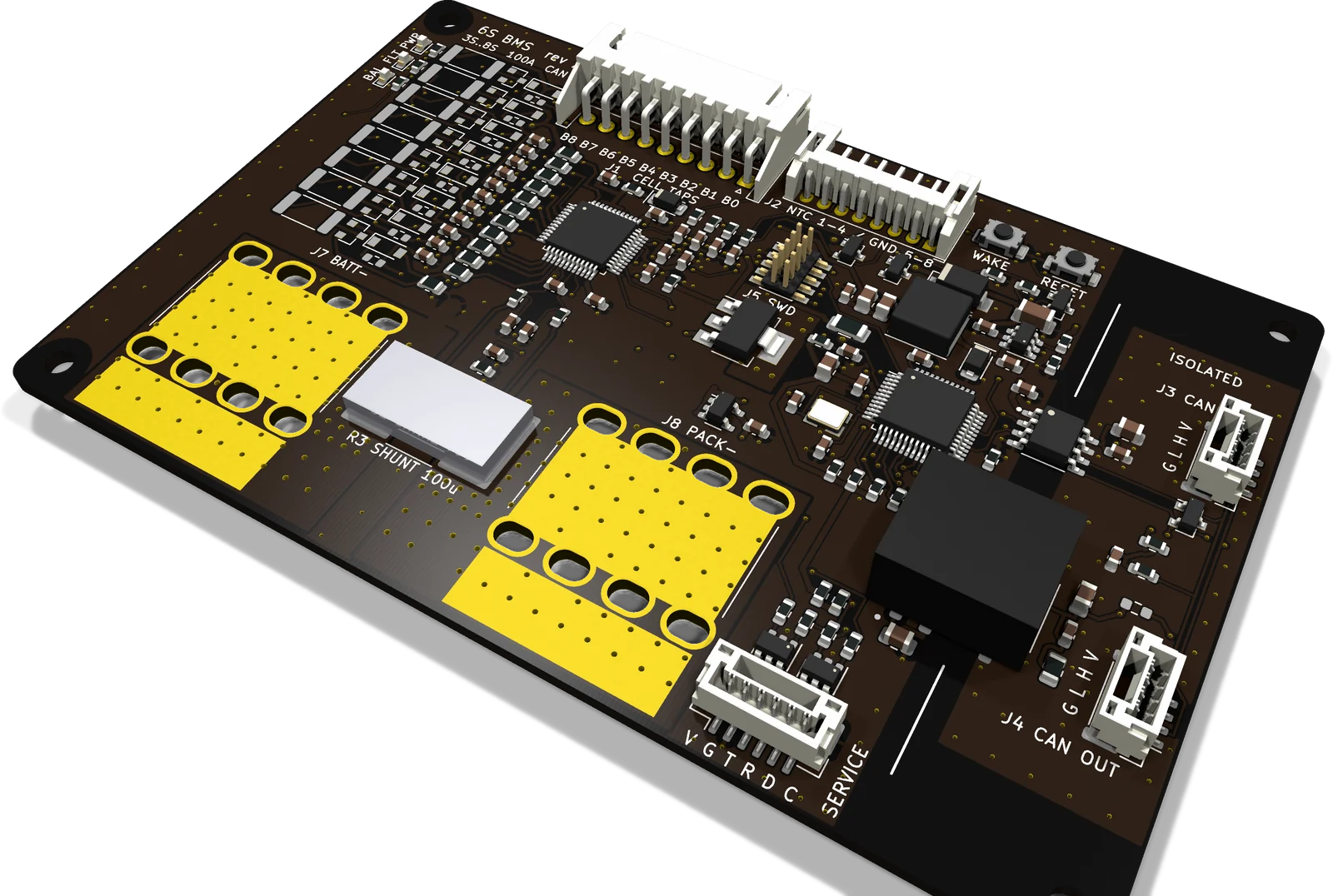
Most flight controllers read one pack voltage and one current from a power module. A weak, hot or drifting cell shows up only as sag under load, usually late in the flight. MODB-SB sits on the pack, watches every cell and puts that data on the CAN bus the aircraft already uses.
No power MOSFETs, relay or contactor in the pack path. A BMS that opens the power path in flight turns a cell warning into a crash. MODB-SB detects and reports each fault; the flight controller decides whether to land, return or carry on.
The CAN side has its own isolated 5 V supply and ground behind a 4 mm barrier. Ground offsets between packs, ESC returns and the flight controller stay off the bus.
Battery data goes out as standard DroneCAN battery messages, which ArduPilot and PX4 already read. Classic CAN 2.0B and CAN FD run on the same transceiver.
Compared with MODB-BB
MODB-SB covers 3S–8S and measures pack current on the board through a 100 µΩ shunt, so state of charge is coulomb-counted from day one. For 6S–12S LiPo and LiHV packs, see MODB-BB.
What it isn’t
Pack negative passes through the shunt, and PACK+ never touches the board. Nothing is ever opened: acting on a fault is the host’s decision.
02 / Applications
The flight controller sees the weakest cell, not the average, and can trigger failsafes on it — plus real pack current for accurate remaining-charge estimates.
The dock reads SoC, cell spread and temperatures before it charges. Balancing runs while the pack sits.
Every pack reports its own cells, current, SoC and SoH under its own node ID, so each battery is tracked separately.
Stack segments end to end: two 6S modules make a 12S pack. The isolated CAN side lets both share one bus.
SoH and a 32-event fault log live on the pack, so packs are retired on data rather than guesswork.
Ship mode shuts down the monitor and every regulator: under 10 µA from the pack.
03 / How it works
The battery side is referenced to the pack and powered from the top cell tap — no separate supply wire. Only the CAN transceiver and an isolated DC-DC cross the barrier; the bus side makes its own 5 V, so nothing is powered from the harness.
04 / Stackable architecture
Each MODB-SB is a node on an isolated CAN bus, with a node ID set by four solder jumpers — 16 per bus. Two connectors carry the bus in and out of every module, so packs daisy-chain without a hub. Stack side by side for capacity, or end to end for voltage.
05 / Sensing and state estimation
Cell voltages, pack current and temperatures feed a hardware coulomb counter and on-board firmware. The result is a charge and health estimate that does not drift over flights.
The monitor’s hardware integrator accumulates shunt current continuously. When the pack rests, the count is re-anchored to the cells’ open-circuit voltage for the configured chemistry, and to 100 % at end of charge — so counting error does not build up over flights.
Usable capacity, measured from the charge counted between rest points against the rated capacity; and cell resistance, from the voltage step when the load changes. Both travel with the pack.
The monitor bleeds high cells through the tap resistors. For large packs or short dock turnarounds, a build option adds an external stage per cell. Balancing starts on its own above a set cell voltage and cell-to-cell difference, or on command.
Cell over/under-voltage, over-current in charge and discharge, short circuit in discharge, over/under-temperature on cells and shunt. Each has its own threshold and delay. Reported on CAN within 100 ms (design target) and on the FLT LED.
06 / Make it yours
A locked BMS fixes these at the factory. On MODB-SB they are settings you own — and where your application needs more, the lab builds it with you.
| Setting | Range on MODB-SB | How |
|---|---|---|
| Cell count | 3S to 8S · a mismatch with the wiring is flagged | Solder jumper |
| Chemistry | Li-ion or LiFePO4 | Parameter |
| Fault thresholds and delays | Cell OV/UV · charge and discharge over-current · short circuit · OT/UT | Parameter |
| Balancing | Start voltage and cell-to-cell difference · automatic or on command | Parameter |
| Balancing current | 62 mA internal, or 170 mA external stage | Build option |
| Telemetry rates | Current up to 10 Hz · cells and temperatures from 1 Hz | Parameter |
| CAN bit rate | 250 k, 500 k or 1 Mbit/s · CAN FD data phase | Parameter |
| Node ID and termination | 16 IDs per bus · termination at the bus end | Solder jumper |
| Power connection | Soldered cables or M6 terminals | Build option |
| Protocol | DroneCAN today · CANopen, J1939 or your own | With the lab |
| Firmware logic | Application-specific behaviour · source access | With the lab |
07 / Integration
| Pack current | 10 Hz |
|---|---|
| Cell and stack voltages | 1 Hz |
| Temperatures, 5 points | 1 Hz |
| SoC, SoH, capacity left | with cell data |
| Balancing status | with cell data |
| Faults | on event · 100 ms target |
| Fault log, 32 events | on request |
Target rates, configurable. Settings and the fault log are also reachable over the service port. The CAN connectors are not in Pixhawk DS-009 pin order: use a matching harness.
08 / Specifications
Preliminary, Rev A0. Design figures from the component datasheets, 6S Li-ion at 25 °C unless noted — to be replaced by measured data after prototype tests.
| Series cells | 3 to 8Solder jumpers + firmware setting · Li-ion or LiFePO4 |
|---|---|
| Stack voltage | 8 to 33.6 V36 V absolute design limit (TVS stand-off) |
| Pack current | 100 A continuous · 150 A burstBurst duration TBC |
| Ambient | −20 to +65 °CDesign target |
| Modules per CAN bus | 16 |
| ESD, connector pins | ±8 kV contact, IEC 61000-4-2Design target |
| Cell voltage error | ±5 mV typ at 25 °C |
|---|---|
| Current range | ±300 A targetReported in 10 mA units |
| Current error | ±1 % above 10 A, averaged, after calibration |
| Shunt | 100 µΩ · ±25 ppm/°C · 7 WKelvin sense lines |
| Current conversion | 2.93 ms |
| Temperature inputs | 4 cell NTCs + shunt sensor10 kΩ, B 3380 K |
| Internal | 62 mA per cell at 4.2 VFirmware limits internal balancing to 3 cells at once |
|---|---|
| External option | 170 mA per cell at 4.2 VNPN + 22 Ω, 1 W per cell |
| Active | 22–36 mAAlways on, CAN live |
|---|---|
| Light sleep | 10 mAWakes on CAN activity |
| Deep sleep | < 100 µAWakes on pack current or service port |
| Ship | < 10 µAWakes on the WAKE button |
Active draw includes the isolated CAN side, which stays powered so the bus is always live. Ship mode shuts down the monitor and every regulator.
| CAN nominal bit rate | 250 k, 500 k or 1 Mbit/s |
|---|---|
| CAN FD data phase | up to 5 Mbit/s |
| Isolation, bus to battery | 1500 VDC, 1 minIsolated DC-DC rating · transceiver 3 kVrms |
| CAN bus protection | TVS on CANH/CANL · transceiver tolerates ±58 V |
| Termination | Split 2 × 62 Ω + 4.7 nF, by solder jumper |
09 / Hardware
Parts chosen from JLCPCB and LCSC stock, with alternates in the BOM. These are the choices that set what the board can do.
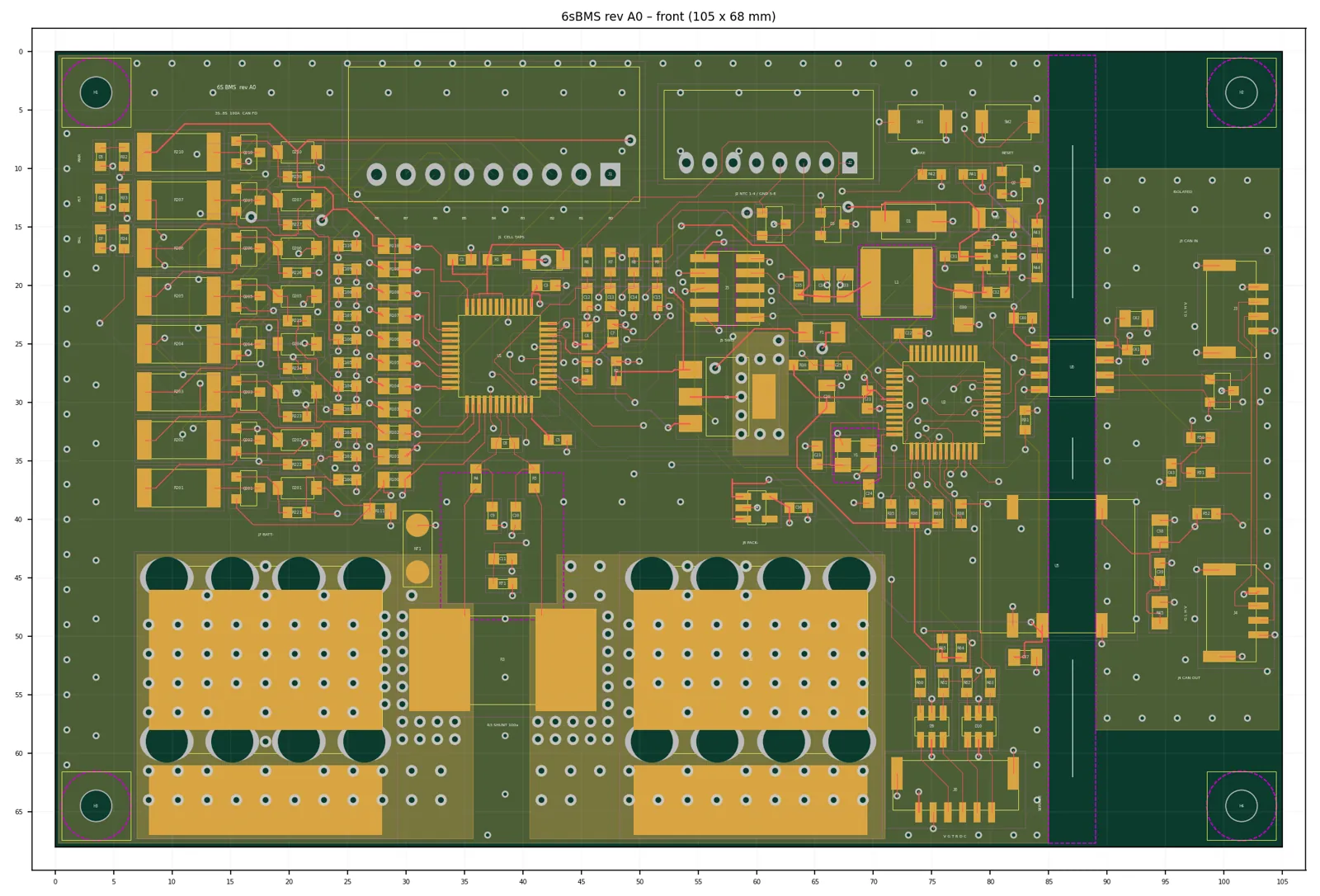
| Outline | 105 × 68 mm |
|---|---|
| Height | 7.25 mm above the PCB · 13 mm with M6 terminals |
| PCB | 4 layers · 1.6 mm · 2 oz outer copper |
| Mounting | 4 × M2.5 on 98 × 61 mm |
| Mass | 40 g, estimate |
| Assembly | Parts on top only; jumpers and test pads below · conformal-coat compatible |
10 / Interfaces and configuration
Hover a connector in the list to find it on the board.
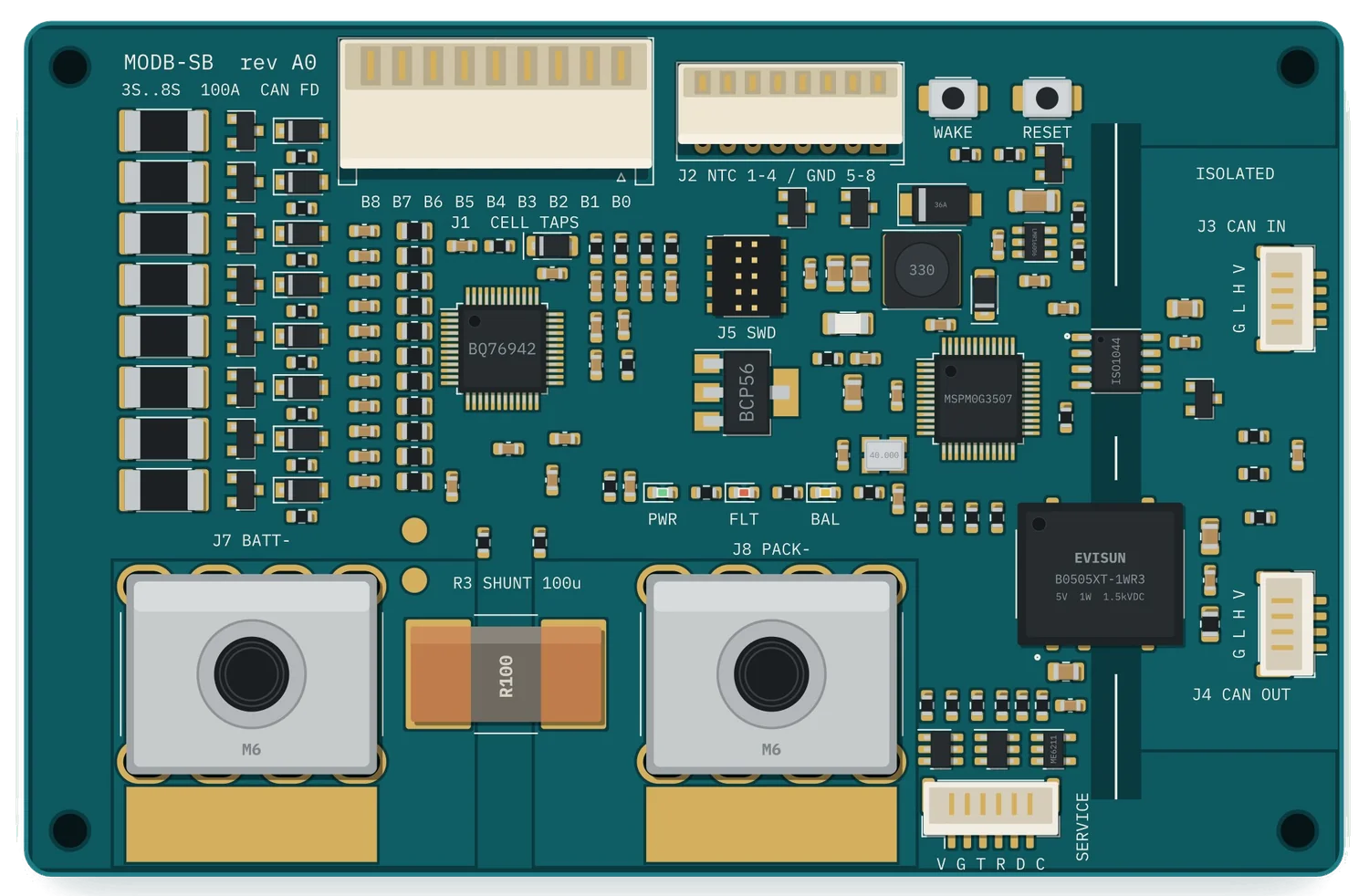
Wire B0 up to BN; leave higher taps empty.
10 kΩ, B 3380 K.
*Open unless the 0 Ω link R52 is fitted. Not Pixhawk DS-009 order — use a matching harness.
UART0 (bootloader) + I²C1, 3.3 V up to 250 mA. Not isolated.
Programming and debug.
M6 terminal (120 A, test builds) or soldered cable on a 20 × 12 mm pad.
| Cell count | 3S–8S by the JS/JPC solder jumpers on the back, plus the matching firmware setting. Full table on datasheet page 7. |
|---|---|
| Node ID | JID0–JID3 form a 4-bit node ID, 0–15. A closed jumper is a 0. |
| Termination | TERM closed adds the split termination. Close it on the last module only. |
11 / Enclosure
A printed ASA shell on an aluminium base. Heat from the shunt goes down through a gap pad and a heat pedestal into the base plate, then into whatever it is bolted to: an airframe, a robot chassis or a battery box.
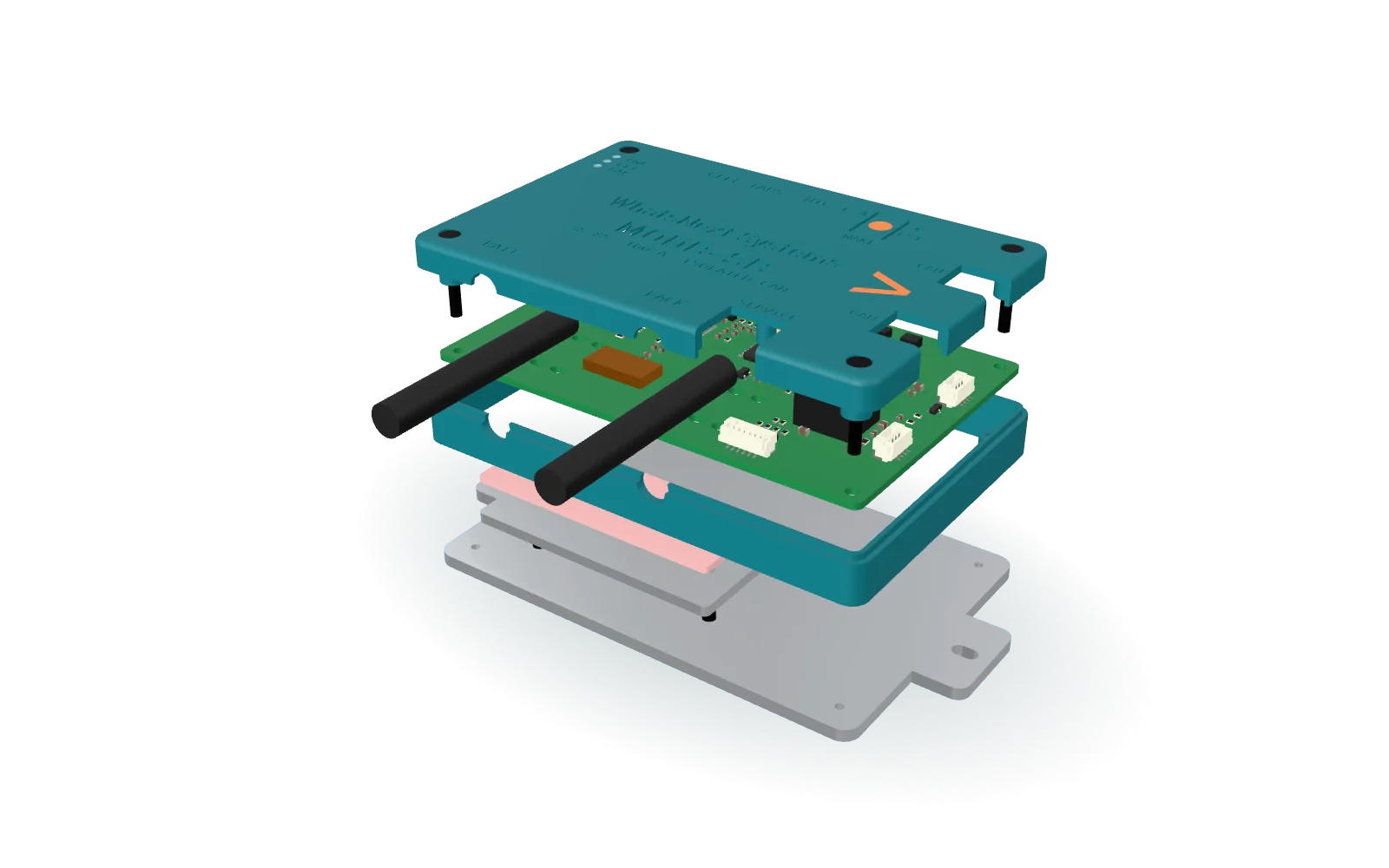
| Outside | 110.6 × 73.6 × 19.2 mm |
|---|---|
| Mounting | 2 × M3 slots, 134.6 mm across the ears |
| Materials | Printed ASA shell · aluminium base plate and heat pedestal · 2 mm insulating gap pad |
| Power cables | 2 × 8 AWG, soldered and clamped in the shell |
| Fits | Soldered-cable build (not the M6 terminals) |
Design figures, Rev A0. Thermal performance will be published after testing.
12 / Build options
| Option | Standard | Alternative |
|---|---|---|
| Power connection | Soldered cables on 20 × 12 mm pads · 7.25 mm tall | M6 terminals, 120 A · 13 mm tall |
| Balancing | Internal, 62 mA per cell | External stage fitted, 170 mA per cell |
| Enclosure | Bare board, open-frame mounting on 4 × M2.5 | Printed ASA case on a 3 mm aluminium heat base · 110.6 × 73.6 × 19.2 mm · soldered-cable build |
| Cell count, node ID, termination | Solder jumpers, set at integration | |
Preliminary: Rev A0 schematic and layout complete; prototype samples and measured data follow. Specifications may change without notice.
Need it changed for your system? Every change starts with your problem. How we work
Contact
Prototype samples, dock integration, series-stacked packs and custom harnesses.
Datasheets
Preliminary documents. Figures are design targets until measured on Alpha hardware.