Smart battery packs
Crimp the cell harness to the board and it travels with the pack. Only the CAN lead and the wake-button lead leave the wrap.

Capabilities
Event-based visionNewCameras that see fast movement without blur.Battery and powerBattery boards that report every cell to the machine.Long-range linksRadio links that keep a drone connected far from its pilot.Embedded hardwareElectronics built for heat, shaking and weather.Products
MODB-BB 6S–12SMonitor, balancer and fuel gauge for large drone packs.MODB-SB 3S–8SCompact BMS with on-board current sensing to 100 A.MODL-Core pMDDL2450Carrier board for Microhard pMDDL IP-mesh radios.All productsWhich battery board do I need?Battery boards for your applicationCompany
HomeAboutTell us your problemSmart battery management · 6S–12S
Every cell on the bus.
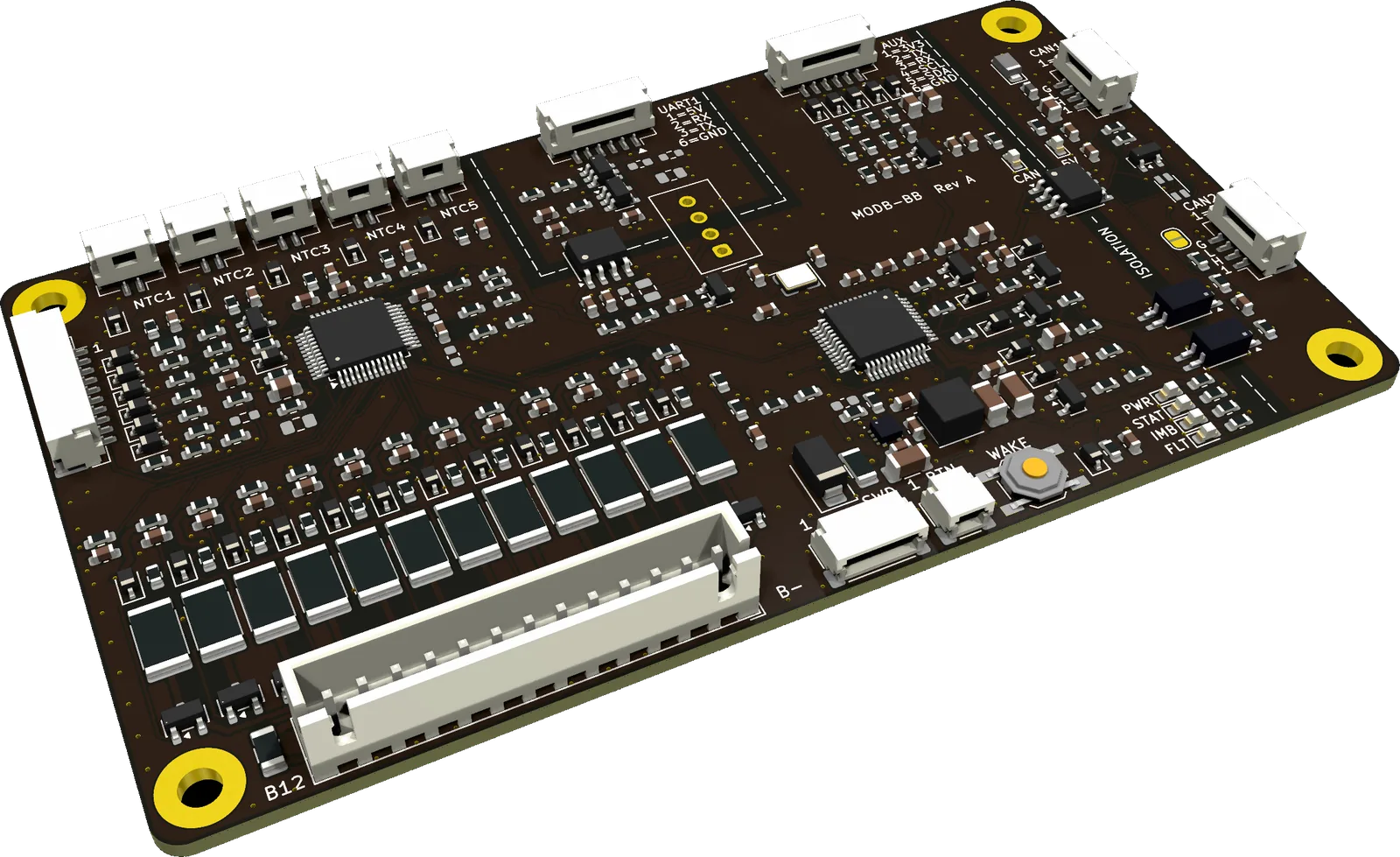
MODB-BB watches every cell of a 6S–12S drone pack, balances it on its own, and reports all of it to the flight controller over isolated CAN.
Rev A · Alpha build · firmware in development
01 / In plain words
MODB-BB sits on the pack’s balance lead and reports what a power module never shows: every cell voltage, five temperatures, balance state, charge and health. It speaks standard DroneCAN, so the flight controller needs no custom driver.
What it is
For 6S–12S packs. It mounts inside the pack as a smart-battery board, or on the airframe on the balance lead.
What it isn’t
No power MOSFETs and no main-current path on the board, so it cannot cut power in flight. It detects, reports and alarms. Switching and current sensing are plug-on modules.
02 / Applications
Crimp the cell harness to the board and it travels with the pack. Only the CAN lead and the wake-button lead leave the wrap.
The board stays on the frame and plugs into the pack’s balance lead through an adapter matched to the cell count. Packs stay stock.
Powering the dock’s CAN bus wakes the pack. Cell data and balancing run through the whole charge with no button press.
One MODB-BB per pack on one bus. Each reports under its own battery_id, so ArduPilot tracks BATT, BATT2 and on.
Cycle count, over-discharge count, SoH and fault log stay on the pack, so the history travels with the battery.
Ship mode draws 2–5 µA (design estimate). The BMS is never the reason a stored pack runs flat.
03 / How it works
The BMS side is referenced to the pack’s cell negative. CAN and UART1 each sit on their own isolated island, so no ground current can flow between the pack and the flight controller through a data cable.
Cell input, RC filters, 12 balancing channels, the monitor IC, five NTC ports and a stack-fed 3.35 V supply. Ground is the pack’s cell negative.
Isolated CAN transceiver on the barrier, powered by the bus 5 V from the flight controller. Bus power present also wakes the board through optocouplers.
A second isolated port for a Pixhawk TELEM connection or a companion device, on its own digital isolator.
04 / Features
About 100 mA per cell through external FETs, during charge, at rest and in sleep — no host command. Up to 4 cells at once; firmware stops it above ~75 °C.
Two latching pass-through ports on one galvanically isolated bus. DroneCAN on classic CAN at 1 Mbit/s; the transceiver and MCU support CAN FD to 5 Mbit/s.
Charge from rest voltage per chemistry, or coulomb counting with the current module. Health, cycle count, over-discharge count and fault log in non-volatile memory.
Cell over/under-voltage, over/under-temperature on all 5 NTCs and open-wire detection run in the monitor IC. Detection keeps running without the MCU.
JST-GH connectors in Pixhawk DS-009 pin order, so standard 1:1 cables fit. Standard DroneCAN battery messages; ArduPilot and PX4 need only stock parameters.
2–5 µA in storage (design estimate). Wakes on a button press or when the CAN bus powers up.
Plug-on modules add current sensing, Bluetooth and a pack switch through the EXP and AUX ports. Several packs share one CAN bus.
Latching connectors on every data port, 4-point M3 mounting, designed for −20 to +85 °C. Built toward RTCA DO-160G practice; not certified.
Modular roadmap
05 / Make it yours
A locked BMS fixes these at the factory. On MODB-BB they are settings you own — and where your application needs more, the lab builds it with you.
| Setting | Range on MODB-BB | How |
|---|---|---|
| Cell count | 6S to 12S · checked against the wiring at every boot | Solder jumper |
| Chemistry | LiPo 4.20 V · LiHV 4.35 V · Li-ion | Parameter |
| Pack capacity | Any capacity | Parameter |
| Protection thresholds and delays | Cell over/under-voltage · over/under-temperature per NTC | Parameter |
| Balancing | Thresholds and cells balanced at once | Parameter |
| Temperature map | Which NTC watches which cell or part | Parameter |
| Battery ID | One ID per pack on a shared bus | Parameter |
| CAN termination | Closed on the last board on the bus | Solder jumper |
| UART1 supply | FC-powered (V01) or isolated 5 V out (V02) | Build option |
| Current, Bluetooth, pack switch | Plug-on modules (planned) | Build option |
| Protocol | DroneCAN today · CANopen, J1939 or your own | With the lab |
| Firmware logic | Application-specific behaviour · source access | With the lab |
06 / Integration
Standard connectors, standard messages. The flight controller treats each MODB-BB as a DroneCAN smart battery; a dock or ground station on the same bus reads the same data.
| BatteryInfo · 1092 | Pack voltage, current*, temperature, SoC, SoH, capacity, status flags, battery_id |
|---|---|
| BatteryInfoAux · 20004 | Every cell voltage, cycle and over-discharge counts, is_powering_off |
| NodeStatus · NodeInfo | Health, uptime, firmware version, board revision |
| param.* | Cell count, capacity, chemistry, battery_id, thresholds, NTC map |
* Without a current module, current is reported as not available (NaN), never as 0 A. Firmware is in development; this is the design specification, to be validated with ArduPilot and PX4 on Alpha units.
ArduPilot
CAN_P1_DRIVER    = 1
CAN_D1_PROTOCOL  = 1
BATT_MONITOR     = 8
BATT_SERIAL_NUM  = battery_id
# next pack: BATT2_MONITOR = 8, BATT2_SERIAL_NUM
PX4
UAVCAN_ENABLE   = 2
UAVCAN_SUB_BAT  = 1
Powering the dock’s CAN bus wakes the pack. No button press.
Balancing runs on its own during charge and at rest; the dock sends no command.
Every cell voltage and temperature is live on the bus. Terminate on the highest cell, not on pack voltage.
The base board does not switch or limit charge current.
07 / Specifications
MODB-BB Rev A, variant V01. Monitor figures are from the TI BQ76952 datasheet. Values marked “design estimate” are calculated and will be confirmed on Alpha hardware.
| Series cells | 6 to 12Solder jumpers plus a parameter; supplied as 12S |
|---|---|
| Cell chemistry | LiPo · LiHV · Li-ion4.20 V · 4.35 V · down to 2.5 V per cell |
| Stack voltage | 15.0 to 52.2 V6S × 2.5 V to 12S × 4.35 V |
| Input protection | 58 V TVS, 0.5 A 63 V fuse |
| Operating temperature | −20 to +85 °CDesign target, not yet tested |
| Storage temperature | −40 to +85 °C |
| Cell voltage accuracy | ±5 mV at 25 °C±10 mV 0 to 60 °C · ±15 mV −40 to +85 °C (monitor IC) |
|---|---|
| Cell ADC | 16 bit · 2.93 ms per conversion |
| Temperature inputs | 5 × NTC 10 kΩ, B 3435 KOT and UT on all 5 in hardware |
| Board temperature | Balancer NTC and monitor die |
| Pack current | With the MODB-CS module (planned)Shunt into the monitor’s SRP/SRN; not on the base board |
| Balance current | ~100 mA per cell at 4.2 V82 mA external + 18 mA internal |
|---|---|
| Method | External N-FET and 51 Ω, 1 W resistor per cell |
| Cells at once | Up to 4 (default limit) |
| Active in | Charge, rest and sleep — autonomous, no host command |
| Thermal stop | 75 °C, from the balancer NTC |
| Supply | From the cell stackLoads all cells equally; buck to 3.35 V |
|---|---|
| ACTIVE | 23 mA at 3.3 VMonitor running, CAN on, balancing. Stays ACTIVE while the CAN bus is powered |
| STANDBY | 35–50 µA + MCU STOPBalancing continues. Wakes on button, bus power, alert or timer |
| SHIP | 2–5 µAEverything off. Wakes on button or bus power |
| AUX 3.3 V out | 150 mA max |
| EXP 3.3 V out | 100 mA, PTC-protected |
Currents are design estimates. SHIP follows a 5 s button press, a CAN command, a long idle or a low-cell storage limit, after publishing is_powering_off.
| CAN transceiver | ISO1044B, 3 kVrms part ratingFunctional, not safety, isolation |
|---|---|
| CAN data rate | 1 Mbit/s classic CAN at launchHardware is CAN FD-capable to 5 Mbit/s |
| CAN bus-side supply | 4.5–5.5 V from the bus 5 V pinUp to 70 mA while transmitting |
| CAN bus protection | ±58 V fault · ±12 V common mode · TVS per line |
| UART1 | ISO7721 digital isolator |
| Barrier spacing | 2.5 mm, copper to copper, every layer |
| Cell OV / UV | Monitor hardware |
|---|---|
| OT / UT, NTC1–5 | Monitor hardware |
| Open cell tap | Monitor hardware |
| Over-current, short circuit | Monitor, with the MODB-CS module |
| NTC open / shorted | Firmware, reported as sensor fault |
| Cell count vs setting | Firmware, every boot |
| Config, stale data, hang | Read-back, CRC, watchdog |
08 / Hardware
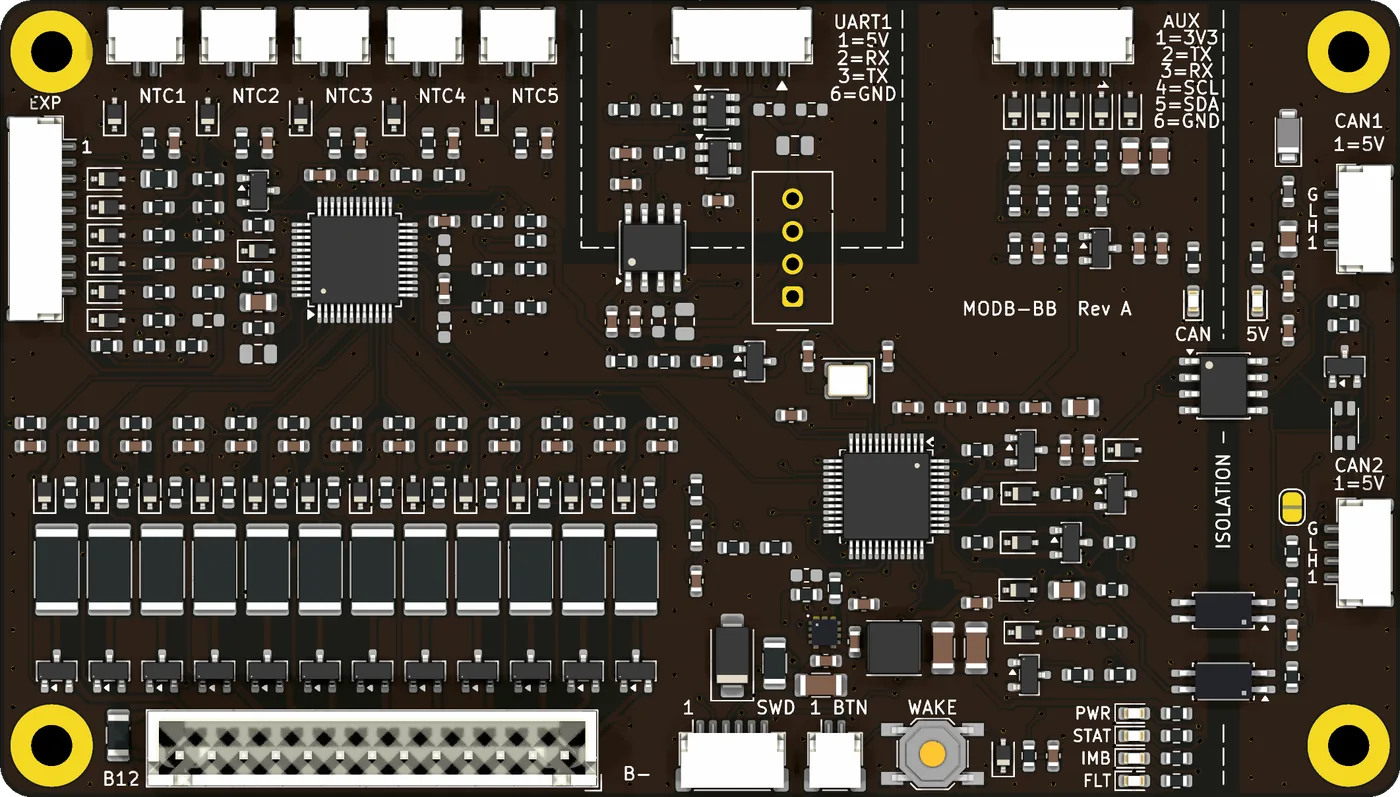
Parts chosen for accuracy, low standby current and stock at LCSC/JLCPCB, with second sources identified. Only the decisions that change what the board can do are listed here.
| PCB | 4 layers · 1.6 mm · FR-4 TG155 · ENIG |
|---|---|
| Height | 7 mm at the cell header · 4.5 mm elsewhere |
| Mounting | 4 × M3 on a 101 × 54 mm pattern |
| Coating | Acrylic conformal coat (IPC-CC-830) for flight builds; Alpha units ship uncoated |
09 / Connectors and mechanical
Data ports on latching JST-GH in Pixhawk pin order. The isolation barrier runs down the right edge: everything past it belongs to the flight controller’s ground.
N-cell harness. 12S uses pins 1–13 in order.
Pass-through; 1:1 Pixhawk CAN cable.
1:1 cable to a Pixhawk TELEM port.
10 kΩ, B 3435 K. NTC1–3 also on bottom pads.
BMS ground. For MODB modules only.
Not isolated. Modules only — never the FC.
Pin 1 rests near stack voltage: use an insulated switch.
Pixhawk Debug Mini. Bench use only.
| PWR · green | 3.3 V rail on |
|---|---|
| STAT · green | 1 Hz heartbeat in ACTIVE |
| IMB · amber | On: imbalance over limit. Blink: balancing |
| FLT · red | On: latched fault. Blink code: fault class |
| CAN · orange | Frame traffic |
| 5V · blue | CAN bus 5 V present |
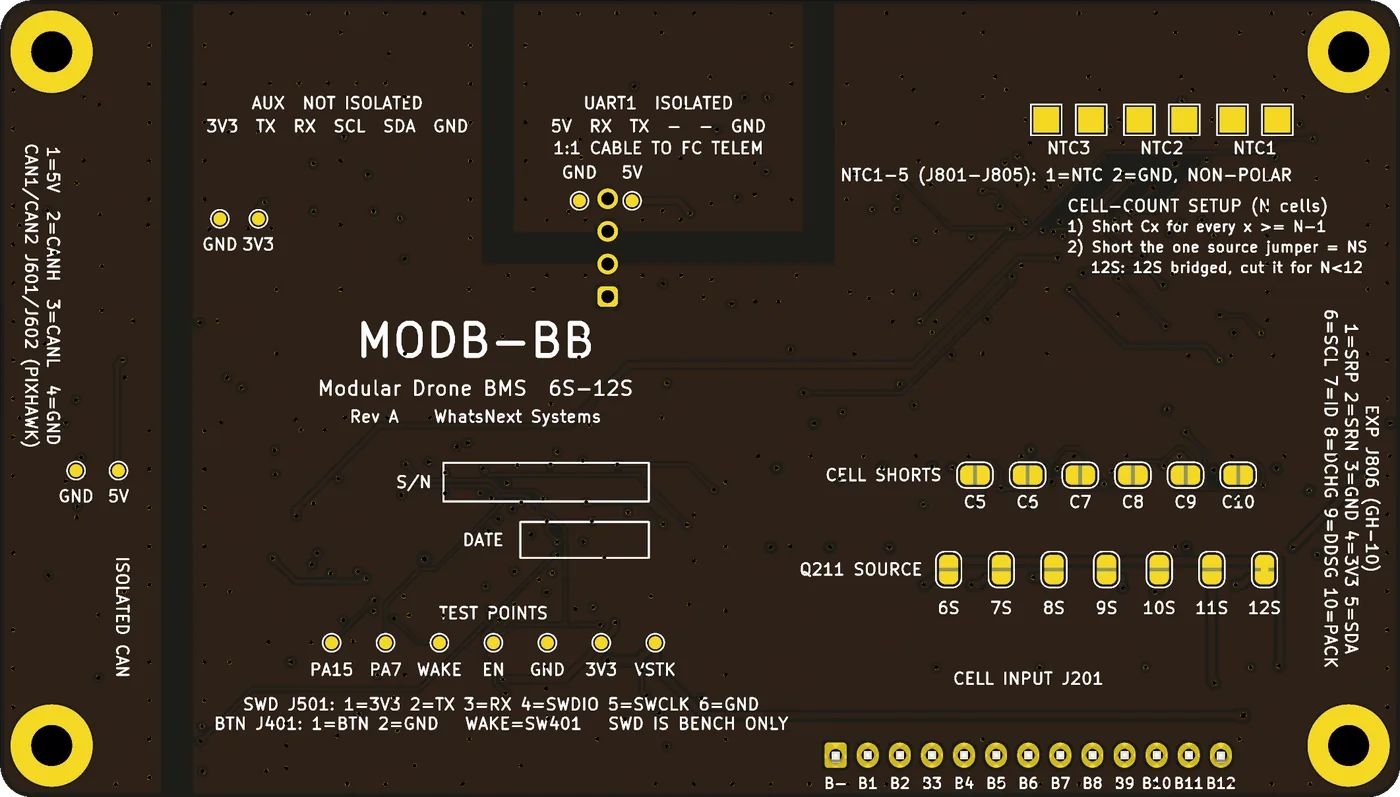
Boards ship as 12S (JP226 bridged at the factory). For 6S–11S: cut JP226, close the jumpers listed for your cell count on the bottom side, and set the matching cell-count parameter. The firmware checks the wired cell count against the setting at every boot and flags a mismatch.
| 6S | JP205–JP210 · source JP220 |
|---|---|
| 7S | JP206–JP210 · source JP221 |
| 8S | JP207–JP210 · source JP222 |
| 9S | JP208–JP210 · source JP223 |
| 10S | JP209, JP210 · source JP224 |
| 11S | JP210 · source JP225 |
| 12S | none · source JP226 (factory) |
10 / Variants and status
UART1 is powered by the flight controller’s TELEM 5 V.
Isolated 5 V out on UART1 pin 1 for sensors. Never connect it to a flight controller.
Cell count 6S–12S, default 12S. Firmware: DroneCAN first; CAN bootloader, Cyphal and CAN FD follow.
Preliminary: MODB-BB Rev A Alpha build, layout R3, firmware in development. Specifications are design targets and may change. Coming next: MODB-SB, the compact 3S–8S board with current sensing — see MODB-SB.
Need it changed for your system? Every change starts with your problem. How we work
Contact
Alpha units, integration help for ArduPilot and PX4, custom cell counts and harnesses.
Datasheets
Preliminary documents. Figures are design targets until measured on Alpha hardware.